


Marathon Health
3.588.00 Reviews
App Specs
- Version
- 2026.6.5
- Updated On
- License
- Free
- Downloads
- 50,000+
- Developer
- Marathon Health
- Categories
- Medical
- Platform
- Android
Screenshots
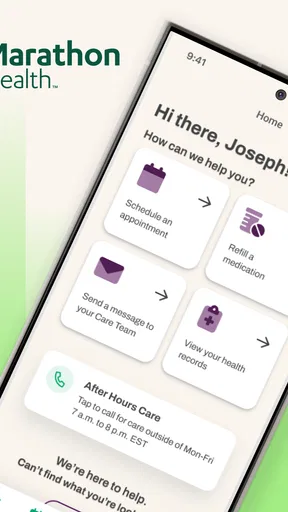
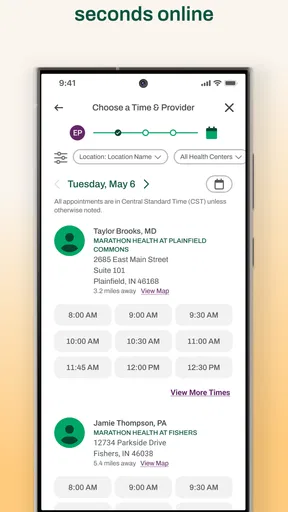
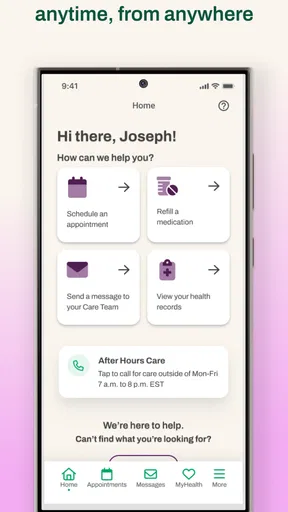
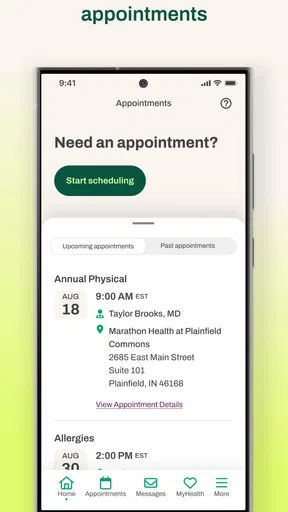
 Analysis by AppCompare
I approached Marathon Health as a practical medical app rather than something to open casually. Its purpose is straightforward: it is meant to sit alongside a person’s everyday healthcare routine, with the developer Marathon Health presenting it as a companion for better health. That sounds simple, but medical apps are judged less by flashy presentation than by whether they help at the exact moment a user needs them.
My overall impression is mixed but useful. The app is free, available to an Everyone-rated audience, and has reached over 50 thousand installs, so it is accessible enough for people who want to try it without committing money. At the same time, its average rating of 3.5 from roughly 184 ratings suggests that the experience is not equally smooth for everyone. I would not treat that score as a reason to dismiss it, but I would take it as a reminder to approach setup carefully and keep realistic expectations.
Where the experience can become difficult
The first challenge with a healthcare app is often not the medical content. It is getting into the right account, reaching the correct service, or understanding what the app expects from you. A person may install it while trying to manage a health task quickly, only to discover that the important step is connected to an existing relationship with Marathon Health rather than to the installation itself.
That distinction matters. Installing a medical app does not automatically create access to every service associated with its developer. If you are trying it because an employer, clinic, or care program directed you there, use the exact details and instructions you were given. If you downloaded it simply because the name sounded relevant, the app may not be useful until you have the appropriate connection to Marathon Health.
I also think the short store wording can create an expectation gap. “By your side for better health” is encouraging, but it does not explain the day-to-day path a new user should follow. I would therefore avoid opening the app with a vague goal such as “manage everything.” Decide first whether you are trying to reach a health service, review information, complete a task, or contact support. A specific aim makes it much easier to notice where the process stops working.
Another common point of friction is treating a failed screen as a medical problem. A blank page, an unsuccessful sign-in, or a stalled loading state usually says more about access, connectivity, or the current app session than about your health information. That is why I recommend separating two questions: “Can I use the app?” and “What healthcare action am I trying to complete?” Keeping those questions separate prevents unnecessary confusion.
The app’s current version is 2026.6.5, and it supports Android from version 9 onward. That makes the operating-system check especially important on older phones. A device can appear modern enough for ordinary apps while still having an outdated system component that affects sign-in screens, secure pages, or background services. Before assuming the app itself is broken, confirm that the phone meets the minimum system requirement and that its normal system updates are complete.
Worth Reading Before You Choose

EA SPORTS FC Mobile 26 Is a Bigger Football Game, but It Takes Time

Flipboard Shows What News Apps Must Do Beyond the Feed

Switching to Android Auto Means Rethinking Your Driving Routine

Google Calendar Makes a Crowded Week Easier to Manage

Ludo King Makes the Most of the Minutes Between Plans

Baby Panda World Brings Quick Play to Modern Phones, but Its Game Library Feels Busy
What I check before blaming the app
My first check is simple: I confirm that I am using the intended device account and that the phone has a stable internet connection. I then close the app completely and reopen it once, rather than repeatedly tapping a button that appears unresponsive. If the problem happens only on one network, switching between Wi-Fi and mobile data can help identify whether the connection is involved.
I also look at the phone’s date and time settings. Secure medical services can behave strangely when the device clock is significantly wrong, even though other apps continue working. This is a general troubleshooting step, not a claim about a special Marathon Health feature, but it is quick and harmless to check.
Next, I make sure there is enough free storage for the app to update or operate normally. I do not recommend deleting health information or clearing anything blindly. If the phone offers an option to clear temporary cache data, I treat that as a later step and read the confirmation carefully. Removing stored app data may sign me out, so I would only do it when I know I can complete the sign-in process again.
Notifications deserve a practical check as well. If you are expecting a reminder or status message, confirm that notifications are allowed for the app and that the phone is not using a battery-saving mode that restricts background activity. I would not rely on a notification as the only way to remember an important medical task, but enabling normal alerts can make the routine less easy to overlook.
One useful habit is to record the exact point of failure. “It does not work” is difficult to troubleshoot. “The app opens, the account screen appears, and the process stops after submitting the details” is much more useful. Note whether the issue happens on Wi-Fi, mobile data, or both, and whether restarting changes anything. This gives support a clear starting point without requiring you to share unnecessary personal health information.
Setting it up without creating extra problems
I would install Marathon Health only from the official app source for the device, then check that the developer shown there is Marathon Health. I would avoid unofficial copies or instructions asking for unrelated credentials. Medical apps deserve the same caution as banking apps: the convenience of a quick installation is not worth losing control of account information.
During setup, I would read each screen instead of rushing through it. If the app asks for access or presents a choice, I would consider whether that access is relevant to the task I want to perform. I would not grant broad access simply because I want to reach the next screen. If a permission is genuinely needed later, it can often be reviewed then, while an unnecessary permission can create privacy discomfort from the beginning.
Account details are another area where accuracy matters. Use the information associated with your Marathon Health access exactly as instructed, including the correct email or identifier if one is required. Small differences in spelling or using a personal address instead of the address connected to a program can make a valid user look unrecognized. I would also avoid creating multiple accounts just because the first attempt feels slow; duplicates can make later support more complicated.
For a shared or family device, I would be especially careful about which person is signed in. A healthcare app should not be treated like a general entertainment account that can be passed between people. Before reviewing anything, verify that the displayed account belongs to you. When using a public or borrowed phone, I would sign out afterward and avoid saving credentials in the browser or keyboard.
There is also a useful distinction between an app update and a fresh installation. Updating is usually the first choice because it may preserve the local session, while uninstalling and reinstalling can remove local settings and require a new sign-in. I would reserve a reinstall for cases where ordinary restarting and updating have not helped, and only after confirming that I know how to access the account again.
Recovering a stalled workflow
When a healthcare task stops halfway through, I prefer a controlled recovery rather than repeating every action at random. First, I return to the app’s starting point and check whether the task actually completed. Tapping a submission button several times can create uncertainty: the screen may look unchanged even though the request was accepted. A quick review of the relevant status or confirmation area is safer than sending the same request repeatedly.
If the app closes or returns to the beginning, I reopen it and repeat only the last necessary step. I would not enter sensitive information again until I know whether the previous attempt was saved. This is one of the most practical habits for any medical service: pause, verify, then continue. It reduces duplicate requests and makes it easier to describe the problem if help is needed.
For a loading screen, I give the connection a moment, then try one restart. If the same screen appears again, I test the other available connection. If the issue is limited to one network, the app may be fine and the network may be filtering, interrupting, or weakening the connection. If it happens everywhere, I move on to checking the app version, device system, and account details rather than endlessly changing network settings.
When an update is available, I install it before doing more invasive troubleshooting. The current release is 2026.6.5, so keeping the installed version current is sensible, particularly on a phone that has not been updated recently. I would also restart the phone after a major app or system update, because this can clear a temporary process problem without affecting account content.
For sign-in trouble, I check the basics in a deliberate order: correct account details, stable connection, device date and time, current app version, and available system updates. I would not send passwords, verification codes, or complete health records to an unknown person offering help. If support is needed, describe the visible error and the steps that led to it, but share only the minimum information required to identify the account safely.
A useful recovery technique is to take a screenshot of a non-sensitive error message, if the phone allows it, and write down the time it occurred. Do not capture private medical details unnecessarily. The goal is to preserve the wording of the technical problem, not to create a record of personal health information. This small distinction can make support conversations more efficient while protecting privacy.
I would also avoid changing several things at once. If I update the app, change the network, clear data, and reinstall in one sequence, I lose the ability to tell which step helped. One change at a time may feel slower, but it produces a clearer answer. That is particularly valuable when the same issue returns later.
When the app is not the cause
Some problems sit outside the app. A service may be temporarily unavailable, an account may not yet be activated, or the healthcare program connected to the user may have its own eligibility or enrollment rules. In those situations, reinstalling the application will not create access that has not been enabled. The right next step is to contact the relevant Marathon Health support route or the organization that directed you to use it.
This is also where expectations matter. Marathon Health is a medical access tool, not a replacement for urgent care. If a symptom is severe, rapidly worsening, or feels like an emergency, I would use the appropriate emergency service or immediate clinical option instead of waiting for an app screen to load. An app can support routine healthcare administration, but it should never delay urgent help.
The same principle applies to clinical decisions. If the app displays information or helps connect you to care, I would use it as part of a broader healthcare relationship rather than treating a digital screen as the final authority for a serious concern. When something seems inconsistent, ask a qualified healthcare professional through the proper channel and keep the app problem separate from the medical question.
Phone settings can also be the hidden cause. Aggressive battery optimization, a nearly full storage drive, an outdated system web component, restricted background data, or a device that has been running for a long time can all affect app behavior. These are not special Marathon Health functions, but they are realistic reasons a medical app may appear unreliable while other apps seem normal.
Older devices deserve a little extra patience. Although Android 9 is the minimum operating system, meeting that requirement does not guarantee that every manufacturer-specific setting will behave identically. If the app works on a newer phone but not on an older one, that comparison is useful evidence. It does not prove the older device is unsupported, but it tells me to investigate the device environment before assuming an account failure.
Who will benefit most from it
I see the strongest fit for people who have been directed to Marathon Health and want a central mobile route for their healthcare tasks. It can be particularly practical for someone who prefers handling routine steps from a phone instead of searching through paper instructions or switching between unrelated services. The free price also lowers the barrier for trying it.
It may suit users who are comfortable checking account status, following guided steps, and doing basic troubleshooting when a screen does not behave as expected. The app’s Everyone age rating makes it broadly approachable, but that does not remove the need for an adult to protect account access on a shared device or to help a less confident user understand what information is being shown.
I would be more cautious about recommending it to someone looking for a general-purpose symptom checker, a complete personal medical diary, or a substitute for an established emergency service. Those are different needs. Marathon Health makes more sense when it is connected to the healthcare pathway the user is meant to access, not when someone expects one free app to cover every medical situation.
Compared with calling a clinic, the app may be more convenient for routine digital tasks and easier to use outside office hours, depending on what access is available to the user. Compared with a general health-tracking app, its value is likely to come from its connection to Marathon Health rather than from broad lifestyle logging. Compared with a web browser, a dedicated app can be quicker to reopen, but a browser may be a useful fallback when the phone app is stuck and the same service is available through an official web route.
That comparison leads to an important trade-off: a dedicated app is convenient only when the account pathway is clear. If you do not know which organization, program, or credentials should connect to it, a general search or a phone call may resolve the underlying issue faster. I would not keep reinstalling the app in the hope that access will appear by itself.
My practical verdict
After looking at Marathon Health as a real-use medical tool, I would describe it as a reasonable option for people who already have a reason to use Marathon Health services. Its free access, broad age rating, and established install base make it easy to try, while the developer’s focus gives it a clearer purpose than a generic wellness app.
My recommendation comes with a condition: set it up methodically. Confirm the Android requirement, keep the app and phone current, use the correct account details, check the network before changing account settings, and verify whether a task completed before submitting it again. Those habits address the most likely points of friction without risking unnecessary loss of local data or repeated requests.
The rating of about 3.5 from around 184 ratings reflects my balanced view: there is enough value here to make the app worthwhile for the right user, but not enough evidence to call the experience universally smooth. I would choose it when Marathon Health is already part of my care route. I would skip it when I need emergency help, a broad health-tracking platform, or access that has never been activated.
In the end, the best reason to use Marathon Health is a clear healthcare task, not curiosity alone. If that task matches the service behind the app, it can become a convenient part of a routine. If the task is unclear or the account connection is missing, troubleshooting the installation will not solve the real problem. That is the distinction I would want a friend to understand before downloading it.
Pros
- Personalized care plans can make health goals easier to track.
- Virtual appointments offer convenient access without visiting a clinic.
- Health resources help users better understand everyday wellness choices.
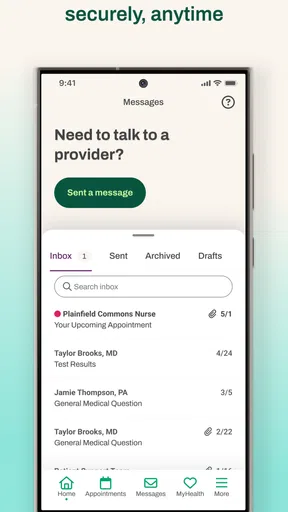
- Secure messaging can simplify communication with care teams.
- Useful reminders may help users stay consistent with appointments and tasks.
Cons
- Some features may require an eligible Marathon Health membership or employer plan.
- App usefulness depends on the services available through your local clinic.
- Appointment availability can vary by provider and location.
- Certain health tools may feel limited compared with dedicated fitness apps.
- Users may need to share sensitive health information to access key features.
FAQs for Marathon Health
What is Marathon Health, and what can I use the app for?
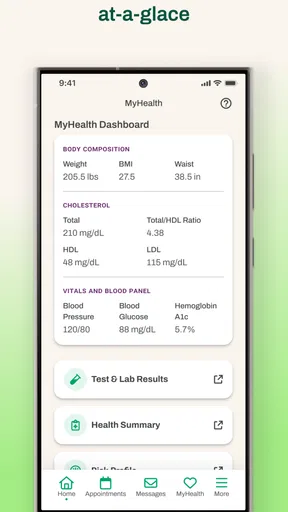
Marathon Health is a digital healthcare companion designed for eligible members of Marathon Health’s employer-sponsored services. Depending on your plan and location, the app may help you access virtual care, schedule or manage appointments, review health information, communicate with care teams, and find available health resources. The exact features can vary, so your employer or Marathon Health membership determines what you can use.
Who can use the Marathon Health app, and how do I sign in?
The app is generally intended for Marathon Health members and eligible dependents rather than the general public. To sign in, you may need to use the credentials or registration details connected to your employer-sponsored healthcare benefit. Some users might be asked to verify their identity, provide personal information, or complete an enrollment process. If you cannot access your account, contact your employer’s benefits team or Marathon Health support.
Can I use Marathon Health to schedule appointments or speak with a provider?
In many cases, Marathon Health allows eligible members to request or manage appointments and connect with healthcare professionals, including through virtual visits when that service is included in their plan. Availability may depend on your employer, care center, location, appointment type, and provider schedules. The app should not be treated as an emergency service; call local emergency services for urgent or life-threatening medical situations.
Does Marathon Health protect my personal and medical information?
Marathon Health handles sensitive personal and health information, so privacy and security are important parts of using the service. The app may require secure authentication and identity verification, and information is handled according to the provider’s privacy policies and applicable healthcare regulations. Before registering, review the current privacy notice and terms. Avoid sharing passwords, verification codes, or medical details through unofficial channels.
Is Marathon Health free to download and use?
The Marathon Health app may be free to download, but access to healthcare services, virtual consultations, appointments, or other features depends on your employer-sponsored benefit and plan rules. Some services may have no additional cost, while others could involve eligibility requirements, copayments, or plan-specific charges. Check your benefits information or contact Marathon Health before relying on a particular service or booking a visit.


